CRM

One place for every customer account

Technonerds CRM is for UK small to medium businesses. Keep customer and company accounts, contacts, notes, tasks, meetings and communication history on the same record. CRM and Prospecting use that same account.

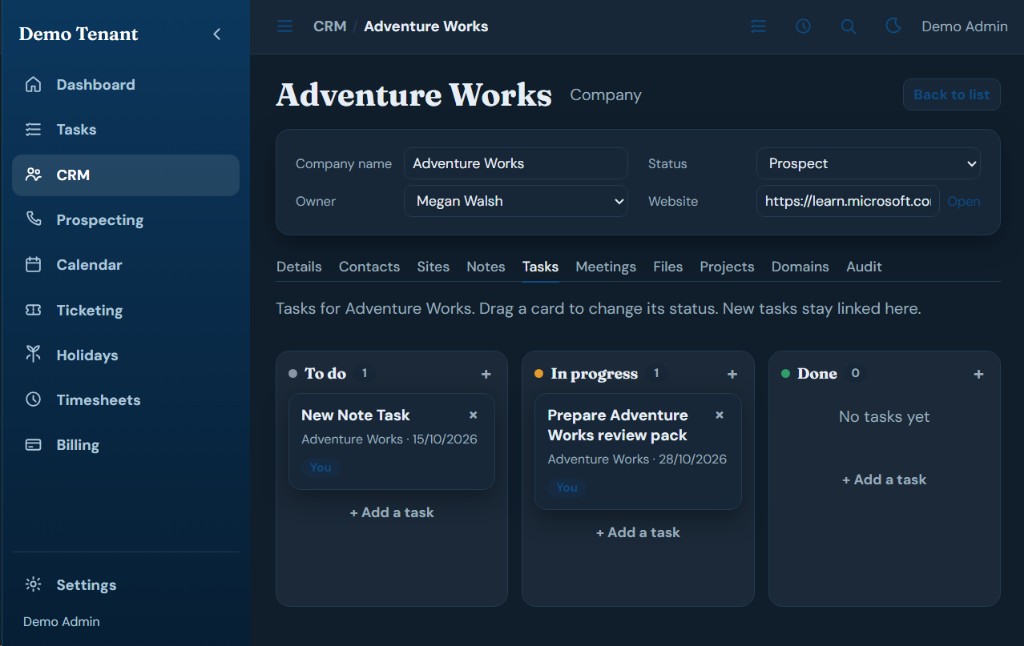
Technonerds CRM showing a customer account with tasks in To do and In progress.

Tasks on a customer account, shown as to do, in progress and done.

Why a small team uses CRM

One record per customer

The account holds the company or person, the contacts you deal with, and the notes and messages that belong with them.

Tasks and meetings in view

Add a task with a due date, or a meeting with a time and a place, on the account it belongs to.

The same account for the team

Colleagues work from one customer record. A task or a meeting can name the person on the team who owns it.

Add modules when you need them

CRM stands on its own. Helpdesk, Timesheets, Billing and Prospecting connect only when those modules are enabled.

What CRM includes

These are the records CRM holds today.

Customer and company accounts

Create an account for a customer or a company. That account is the record the team uses for the relationship.

Contacts, notes, tasks, meetings and communication history are kept on it, so the detail is not split across separate lists.

Contacts

Add the people you deal with on the account, including how you reach them.

Each contact stays with that customer or company, so the team can see who was spoken to.

Notes

Write a note on the account when something is agreed or needs to be remembered.

The next person to open the account can read it without asking around.

Tasks

Set a task on the account, with a subject, notes and a due date. Mark it complete when the work is done.

An owner can be set so someone on the team is responsible. CRM stores the task. It does not complete it for you.

Meetings

Record a meeting on the account, with a start and end, a location, and an outcome once it has happened.

Meetings are entered by the team. CRM does not arrange them or chase them.

Communication history

Notes, calls, emails and meetings stay on the account as the history of the relationship.

It is a record of what happened. It is not an automated follow-up sequence.

How a customer account is looked after

An example for a small team, from the first record through to an ongoing relationship. These are steps people take. CRM does not run them for you.

  1. Open the account

    Create the customer or company record when the relationship starts.

  2. Add the contacts

    Record the people you speak to, on that account.

  3. Keep the history

    Add notes, and record calls, emails and meetings as they happen.

  4. Plan the next action

    Add a task or a meeting so the follow-up is visible to the team.

  5. Stay with the same account

    The relationship continues on that record. When Helpdesk or Timesheets is enabled, related incidents and time can be grouped under a project on the account.

Project records

A project record is a name on the account for a piece of related work. Incidents and time entries can be grouped under it when Helpdesk or Timesheets is enabled.

It groups that work. It is not a project plan, a schedule, or a project management tool.

On the roadmap

A dedicated project management interface is planned. It is not part of CRM today.

CRM and Prospecting — connected from the start

Technonerds CRM and Prospecting work with the same underlying account information.

Every account is accessible through CRM, while those identified as prospects also appear in the dedicated Prospecting workspace.

This means your team can manage sales opportunities, maintain conversations and develop customer relationships without creating separate records as a prospect becomes an established customer.

Explore Prospecting →

Connected modules

These modules are optional. They are separate from the CRM subscription and apply only when you have enabled them.

Helpdesk

Incidents can be linked to the CRM account. A project record can group those incidents. Helpdesk itself is a separate module.

Helpdesk →

Timesheets

Time can be entered against the account, or against a project grouping on the account. The hours stay in Timesheets. Marking time billable does not create a charge.

Timesheets →

Billing

A billing record can use the same account. Invoicing stays in Billing.

Billing →

Built for a smaller team

A UK small to medium business can start with CRM on its own. Register and subscribe yourself, or ask for a demonstration.

Add Helpdesk, Timesheets, Billing or Prospecting when the work needs them. You do not have to take the whole platform.

Questions about CRM

Customer and company accounts, contacts, notes, tasks, meetings and communication history. Project records on an account group related work. They are not a project management tool.

In the Prospecting workspace. Every account is in CRM, and accounts identified as prospects also appear there. You do not create a separate record when a prospect becomes a customer.

No. Helpdesk, Timesheets, Billing and Prospecting are separate subscriptions. They can connect to the CRM account when you have enabled them.

A named group on the account for related work, including incidents and time entries when those modules are in use. A dedicated project management interface is planned and is not available yet.

Use Get Started to register and subscribe yourself, or Request a demo and we will talk you through CRM.

No. Tasks, meetings and history are records your team keeps. The steps on this page are an example of how a team can work. They are not an automated process.

Start with CRM

Register and subscribe yourself, or ask for a demonstration.